tool calling · three modes
A weather request for Paris
→ get_weather {"city": "Paris"}
fast 5.47 tok/s · balanced 3.13 · exact 2.70
All three modes returned the same valid tool call. In exact mode the response matches llama-server byte for byte.
Version 0.1 Beta · Qwen3-30B-A3B · Windows 10 and 11 · Free
Zorlo runs Qwen3-30B-A3B, a 30-billion-parameter AI model, on a Windows PC with 8 GB of memory. The model runs entirely on your computer, so your conversations and files stay with you. Beyond chat, Zorlo works as a coding agent: it writes code, builds websites, reads your documents and runs commands in a folder you choose.
5 MB · Windows 10 or 11, 64-bit
Public beta · no installer, no account
How it works
Qwen3-30B-A3B has 128 small expert networks in each of its 48 layers. For every token it writes, it consults only 8 of them.
The full model stays on your SSD. For each token, Zorlo reads in just the experts that token needs (orange squares).
Experts that are needed again and again are kept in memory, so they are read from disk only once (outlined squares, orange flashes).
The model is 18.6 GB; Zorlo keeps less than 1 GB of it in memory at all times. In the default mode the output is identical to running the full model with llama.cpp.
2.4×
the speed of llama.cpp with the same model on the same 8 GB PC
5.47
tokens per second in fast mode (a token is about ¾ of a word)
0.4 s
to resume a long conversation, even after a restart (69 s the first time)
1280/1280
tokens identical to llama.cpp across 20 test prompts, in the default mode
Performance
All figures are for Qwen3-30B-A3B in 4-bit form (Q4_K_M, 18.6 GB), measured on a reference PC with 8 GB of memory and an NVMe SSD, running Windows 11. Speed is in tokens per second. The comparison is llama.cpp with its default settings. Your results depend mainly on the speed of your SSD and on how much memory is free.
Tokens per second, higher is better
| llama.cpp | 1.43 |
|---|---|
| Zorlo, 256 MB of memory (what a 4 GB PC would have available) | 2.98 |
| Zorlo, 1.2 GB of free memory | 3.47 |
Same model, same output. Zorlo knows in advance which experts each token needs and reads exactly those; llama.cpp relies on Windows to page the model in.
Tokens per second with little free memory, and how closely the output matches
| exact default · 100% identical | 2.25 |
|---|---|
| balanced 98% identical | 2.53 |
| fast 95% identical | 5.47 |
Fast mode uses a compact copy of rarely used experts, so an occasional word can differ. Exact mode never changes the output.
Seconds before the first token of a long request, lower is better
| first request | 69.0 s |
|---|---|
| same prompt again | 4.3 s |
| after a restart | 0.4 s |
Zorlo saves the work it has already done on a prompt to disk, so agents that resend the same long instructions continue from where they left off.
Gigabytes
| model on disk | 18.6 GB |
|---|---|
| memory in an 8 GB PC | 8 GB |
| what Zorlo always keeps in memory | 0.82 GB |
Any other free memory is used to keep popular experts at hand, and is released as soon as another application needs it.
Get started
No installer and no account. You need Windows 10 or 11, 8 GB of memory, about 19 GB free on an SSD, and an internet connection for the one-time model download. Full requirements.
In your Downloads folder, right-click zorlo-v0.1-windows-x64, choose Extract All…, then Extract.
Double-click Zorlo Desktop in the extracted folder. On first start, choose a model; Qwen3 30B is recommended. The model is downloaded once (about 18.6 GB), with a progress bar and automatic resume if the connection drops. If the model is already on your PC, Zorlo finds it and uses it from where it is; you can also point to its folder with Already have this model?
If Windows shows "Windows protected your PC", select More info, then Run anyway. Windows shows this for new applications that are not yet widely installed.
Once the model has loaded (about a minute), the chat opens in the same window. From then on, Zorlo Desktop starts the model directly and keeps it up to date automatically. Zorlo also adds itself to the Start menu: next time, press the Windows key, type Zorlo and press Enter.
When you close the window, Zorlo asks whether to keep running in the background, with the model ready for your next question, or to stop and free the memory. The Zorlo icon next to the clock lets you reopen Zorlo, switch models, start Zorlo with Windows, or Stop Zorlo and quit.
Zorlo can also be started and stopped from Windows PowerShell. The chat then opens in your web browser. After Zorlo has started once, by either method, the zorlo command works in any new PowerShell window, from any folder.
.\zorlo startzorlo startstart http://127.0.0.1:8080Stop-Process -Name zorlozorlo pull resumes interrupted downloads, verifies every file and later fetches only files that changed. Add --lowbit for the optional fast mode (an extra 9.5 GB). Use the folder below so Zorlo Desktop finds the model.
.\zorlo pull Haidershahi1/qwen3-30b-a3b-zorlo models\qwen3-30b-a3bTo build the model files yourself, place Qwen3-30B-A3B-Q4_K_M.gguf (about 18.6 GB, from Hugging Face) next to zorlo.exe and run once:
.\zorlo pack Qwen3-30B-A3B-Q4_K_M.gguf models\qwen3-30b-a3bTo start a downloaded model directly, without the model menu or the update check:
.\zorlo serve models\qwen3-30b-a3b -c 12288zorlo-v0.1-windows-x64.zip · 5,452,347 bytes · SHA-256 4fa88cbfb1a8fc078602cd884d18a5e98c6dbdd0d6f6b89ff61aa585993b3e55
Features
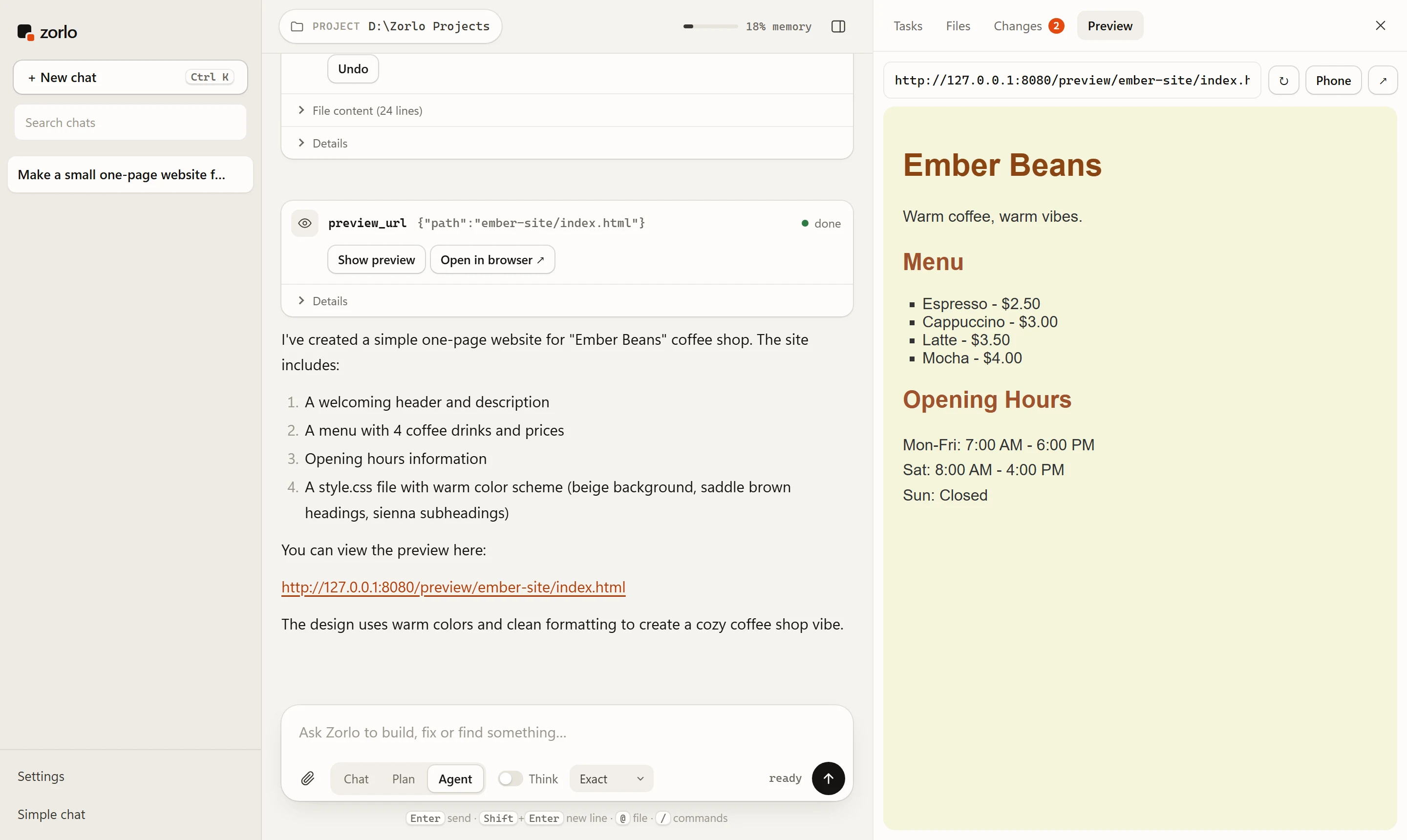
Choose a project folder and describe the task. Zorlo plans, reads and edits files, runs commands, searches the web and previews websites as it builds them. Every file change can be undone, and Zorlo asks before any action you have not allowed in Settings. Plan mode proposes the steps first and changes nothing.
Attach PDF, Word, Excel and PowerPoint files, images, code or text, and ask about them. Zorlo extracts the text, reads scanned pages and the text in images with Windows' built-in text recognition, and gives the model the length of videos and audio. Qwen3-30B-A3B is a text model: it reads the text of an image, not the image itself.
Extend the agent with connectors (MCP servers) for GitHub, Notion, Linear, a real browser, databases, search and more, added with one click from the built-in catalog, or by asking in a chat. Skills add expert instructions for tasks such as creating Word, Excel, PowerPoint and PDF files, and install from GitHub in one step.
With Zorlo's own model, everything runs on your PC; conversations and files are not sent to any AI service. Zorlo uses the internet only to download models, and for web searches and connectors that you enable. Each chat is kept with its project folder, and several chats can run at once.
Run the same agent, with all its tools, on a cloud model. In Settings → Model, choose OpenAI, Anthropic, Google Gemini, DeepSeek, OpenRouter, Groq, Mistral, xAI or Together AI, or any OpenAI-compatible server, including Ollama and LM Studio on your PC. Enter your API key and a model name. The key is stored on your PC and sent only to the provider it belongs to; conversations then go to that provider.
Use Zorlo from your own code or tools: point any OpenAI client at http://127.0.0.1:8080/v1 with any API key. Streaming, tool calls and reasoning are supported.
from openai import OpenAI
client = OpenAI(base_url="http://127.0.0.1:8080/v1", api_key="zorlo")
r = client.chat.completions.create(model="zorlo",
    messages=[{"role": "user", "content": "Hello"}])
print(r.choices[0].message.content)Zorlo also implements the Anthropic Messages API, so Claude Code can run on the local model. Start Zorlo with a larger context for Claude Code's instructions.
.\zorlo serve models\qwen3-30b-a3b -c 20480
set ANTHROPIC_BASE_URL=http://127.0.0.1:8080
set ANTHROPIC_AUTH_TOKEN=zorlo
set ANTHROPIC_MODEL=zorlo
claudeChoose exact (default, identical to llama.cpp), balanced or fast in the app, as a server default with --mode, or per request with a "mode" field. Fast mode requires the compact expert copy: zorlo pull … --lowbit.
# server default for every client
.\zorlo serve models\qwen3-30b-a3b -c 12288 --mode fast

# per request, from your own code
client.chat.completions.create(model="zorlo", messages=msgs,
extra_body={"mode": "exact"})In practice
Recorded on the reference PC with Qwen3-30B-A3B. Speeds vary by about 20% between runs.
tool calling · three modes
→ get_weather {"city": "Paris"}
fast 5.47 tok/s · balanced 3.13 · exact 2.70
All three modes returned the same valid tool call. In exact mode the response matches llama-server byte for byte.
code edit
draft tokens accepted 243 / 243
2.70 → 3.26 tok/s · output identical
When the answer repeats earlier text, Zorlo drafts several tokens ahead from that text and verifies them in a single pass.
agent prompt · restart
prompt processing 69.0 s → 0.4 s
cached state read from disk in 0.12 s · same reply
A system prompt with 60 rules and two tools. After a restart, the saved state loads from disk and the reply is identical to the first run.
documents · images
ticket.png + scores.csv attached
"Your train is on Platform 6, and Ada scored higher."
Zorlo read the text in the photo with Windows text recognition and the table from the CSV file, and the model answered from both.
System requirements
These requirements apply to Qwen3-30B-A3B by the Qwen team, the model offered in Zorlo 0.1, in 4-bit form (Q4_K_M). It has 30.5 billion parameters, of which 3.3 billion are active for each token. Future models will list their own requirements.
Model-specific figures. All numbers on this page were measured with Qwen3-30B-A3B. It runs on an 8 GB PC because it is a Mixture-of-Experts model that uses only a small part of its weights for each token. Larger models, or models that use all of their weights for every token, need more memory and storage and run slower. Each new model will be published with its own tested requirements, and Zorlo Desktop shows the download size and memory requirement before you choose a model. Zorlo 0.1 is available for Windows.
Open Settings → System → About to see your processor and installed memory (RAM), and Settings → System → Storage for free space. Any Intel Core processor from 2015 or later, or any AMD Ryzen processor, is supported.
Zorlo 0.1 is a public beta: it is complete and tested, but has been measured on a limited range of PCs so far. Results on your PC may differ, especially with less free memory or a slower SSD. When a new version is available, Zorlo tells you when it starts.
Yes, for personal and commercial use. Zorlo is licensed under the Functional Source License (FSL-1.1-MIT): you may use, modify and share it for any purpose except offering a competing product or service. Each release becomes available under the MIT license two years after publication.
Yes. The model runs entirely on your PC, and your conversations and files are not sent to any AI service. The internet is used to download models and, if you allow it, for web searches (DuckDuckGo, or Brave Search with your own key) and connectors you add. Web access can be turned off in Settings. If you choose a cloud provider in Settings → Model, conversations are sent to that provider under its terms.
Yes. In the default exact mode the output is identical to running the full model with llama.cpp; in our tests all 1,280 tokens across 20 prompts matched. The optional faster modes may change an occasional word.
Qwen3-30B-A3B is a text model. Zorlo reads the text in pictures and scanned documents with Windows' built-in text recognition and passes it to the model, so it can answer questions about receipts, screenshots and scans, but it cannot describe a photo's visual content.
Close the Zorlo window and choose Stop Zorlo, or right-click the Zorlo icon next to the clock and choose Stop Zorlo and quit. To uninstall, delete the Zorlo folder. Zorlo does not install anything else; if you turned on Start with Windows, turn it off first.
Zorlo uses the ggml library from llama.cpp (MIT license) for computation and produces the same output. It adds expert streaming: it determines which experts each token needs, loads exactly those, and keeps frequently used ones in memory.
Qwen3-30B-A3B is developed by the Qwen team at Alibaba Cloud and licensed under Apache 2.0. Zorlo reorganizes how the model is stored on disk and, for the optional fast mode, creates a compact 2-bit copy of its experts.
About
Founder & Lead Developer
Zorlo was founded and is developed by Haider Md. Faiyaz Hussain Shahi. Large AI models have usually required expensive hardware, while most people use an ordinary PC. Zorlo is designed and tested for that PC: it runs a 30-billion-parameter model in 8 GB of memory, with output identical to the full model. Development continues on support for more models and further speed improvements.